Managing tax obligations across multiple jurisdictions is one of the most complex operational challenges for users reselling the platform. Knowing which states require sales tax registration, which countries charge VAT, how to classify different products, and how to generate invoices for accounts, all while running a growing business, requires dedicated effort and expertise.
To help with this, we have launched Global Tax Compliance, powered by Stripe Tax. This feature helps users configure tax collection, generate tax invoices, and access tax reports for accounts across 100+ countries. It is designed to reduce manual overhead, but tax compliance ultimately remains the user's responsibility throughout.
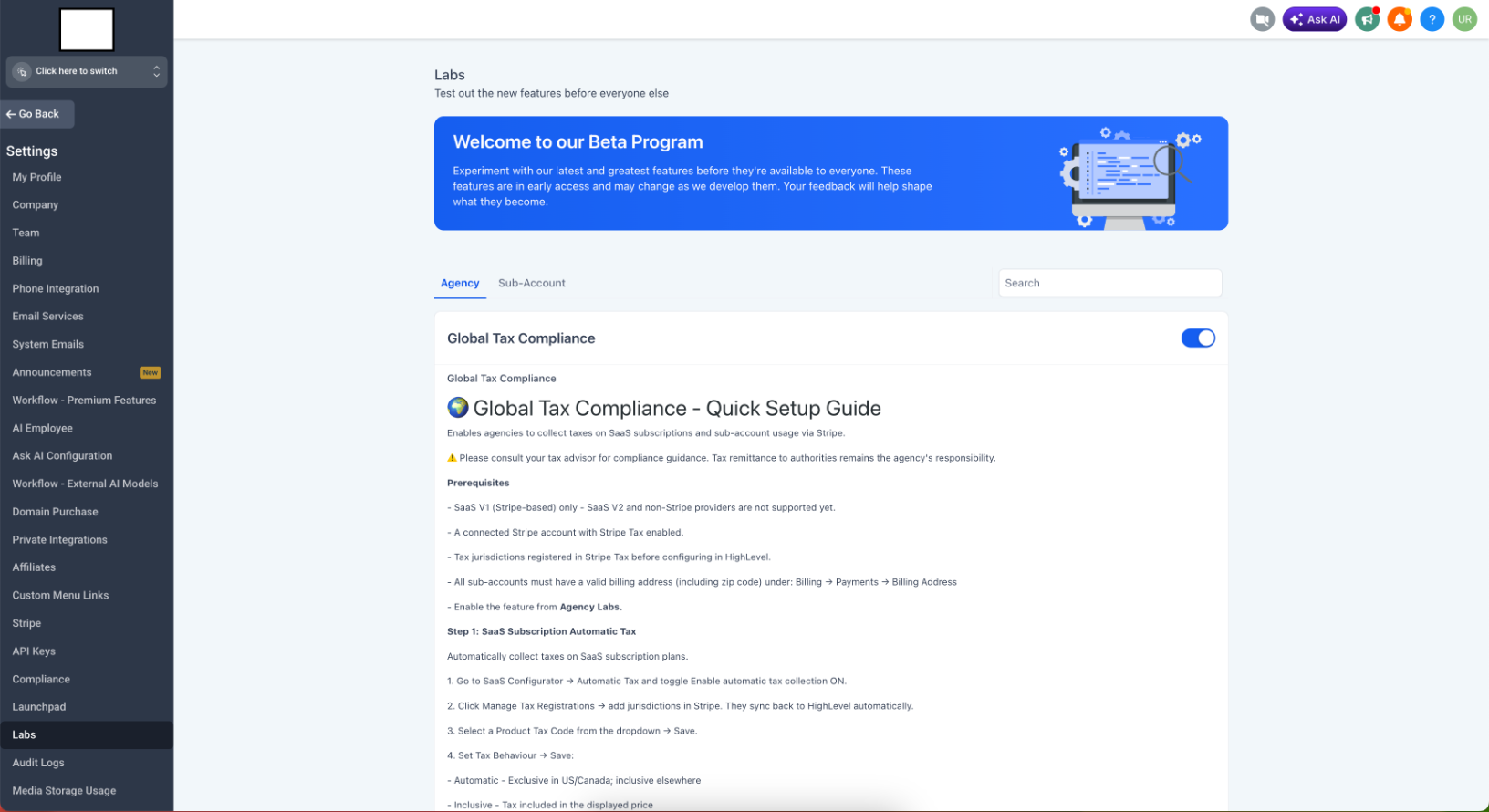
> Enable from Settings > Labs > Global Tax Compliance to get started.
Important Disclaimer
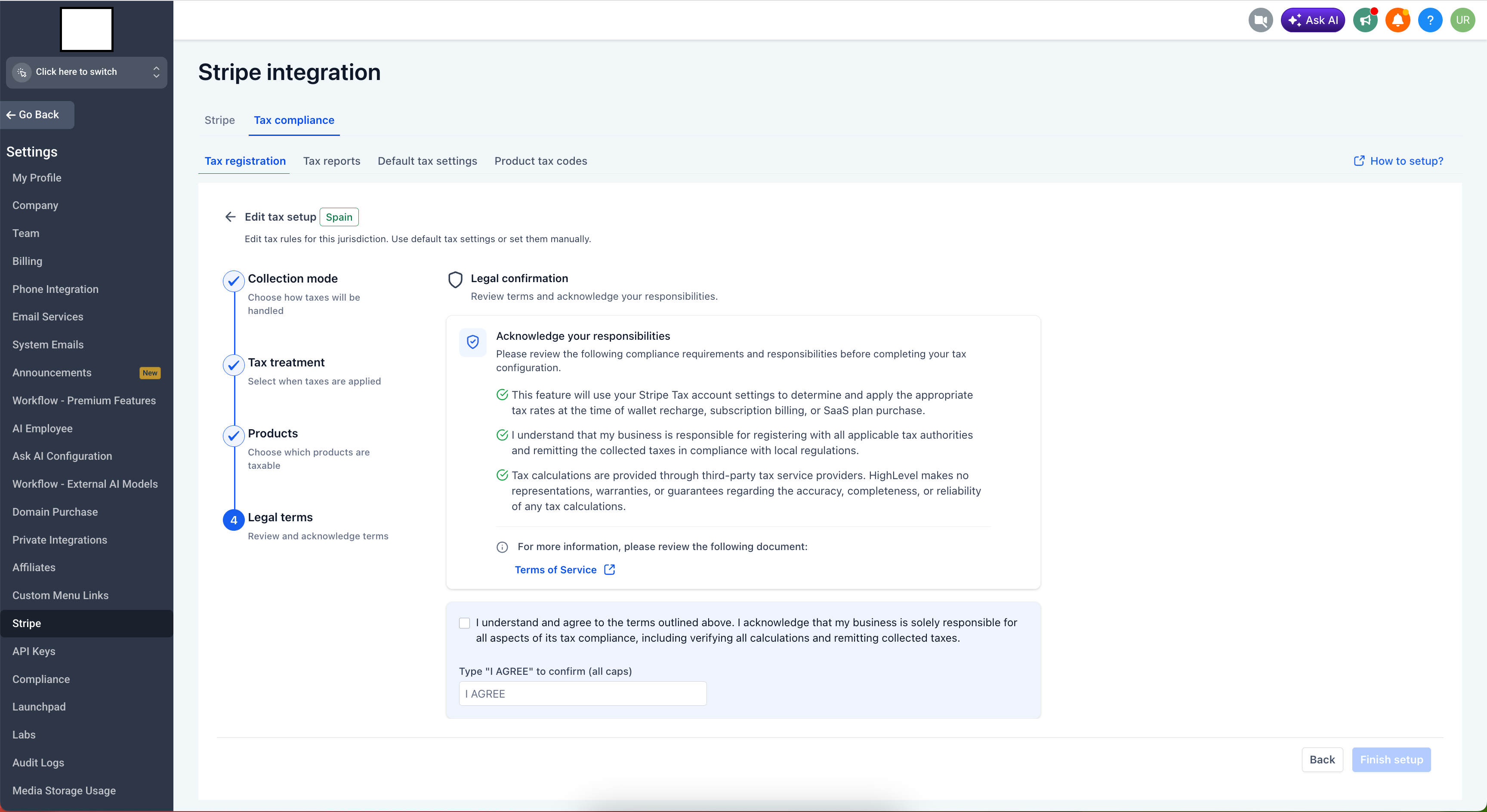
> Tax calculations in this feature are provided through Stripe Tax, a third-party tax service provider. the platform makes no representations, warranties, or guarantees regarding the accuracy, completeness, or reliability of any tax calculations. Your business is solely responsible for registering with all applicable tax authorities, verifying all tax calculations, and remitting collected taxes in compliance with local regulations. Always consult a qualified tax advisor before configuring or relying on this feature for compliance purposes.
How Stripe Tax Works
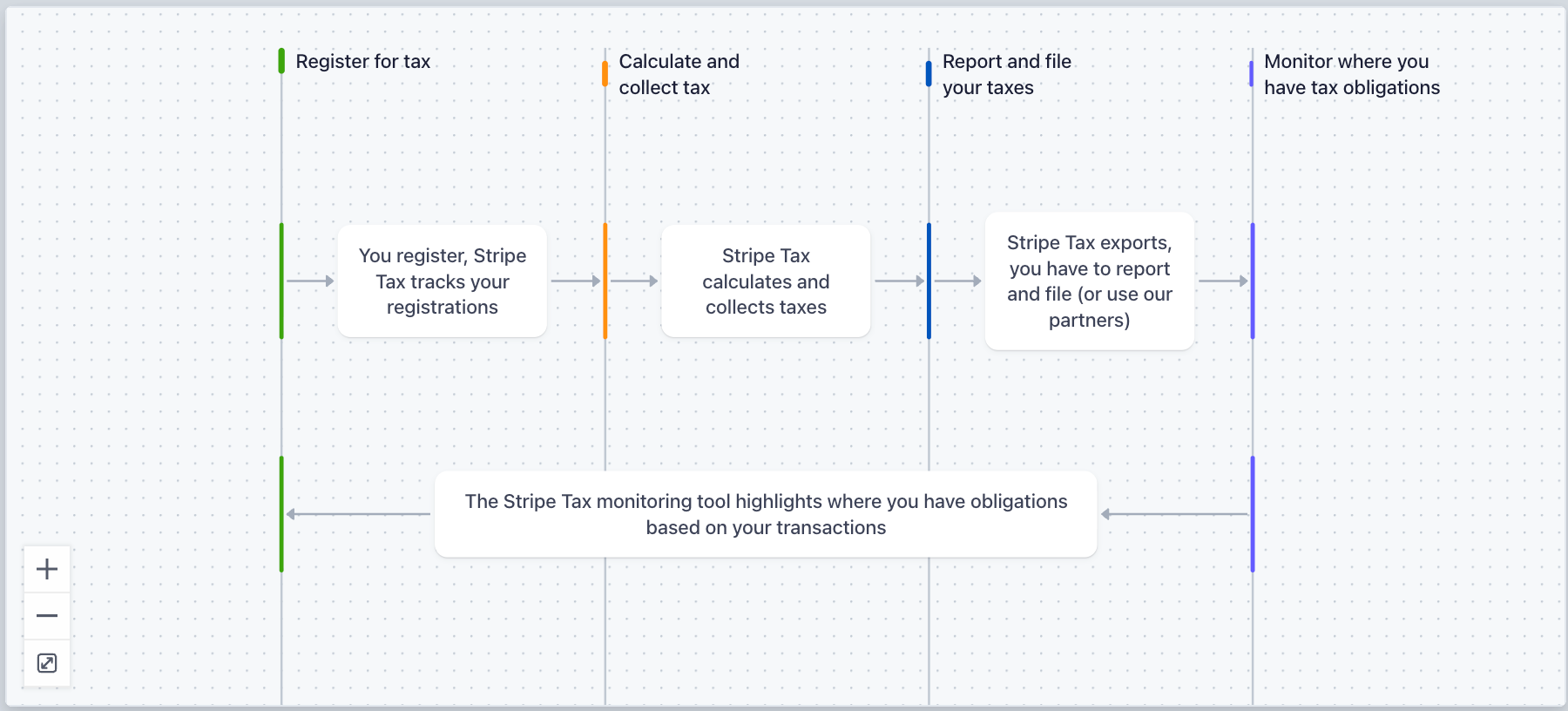
This feature is built on Stripe Tax, Stripe's tax calculation service. Understanding how it works helps you make informed decisions about whether it meets your specific compliance needs.
Each country handles tax on sold products and services differently. In the US, businesses deal with sales tax. Throughout Europe, it is called value-added tax (VAT). Canada and most Asia Pacific countries refer to it as goods and services tax (GST).
Tax applicability and rates vary by location and by the category of product being sold. For example, children's footwear is zero-rated in Ireland but adult footwear is not. Digital services are taxed at the standard rate in most EU countries, but e-books may be subject to a reduced rate. These rules differ across 100+ jurisdictions.
Stripe Tax uses the following data points to determine and apply tax rates:
- Your business address: Used to determine your domestic tax obligations and how cross-border transactions are classified.
- Your tax registrations: Which jurisdictions you are registered in determines where tax is applied.
- Product tax codes: How each product is classified (SaaS, digital service, telecommunications, etc.) determines the applicable rate in each jurisdiction.
- Customer location: The account's billing address is used to determine which jurisdiction's rules apply to a transaction.
- Customer tax status: Whether a customer is a business (B2B) or consumer (B2C) can affect tax treatment, particularly in the EU.
Who This Feature Is Designed For
US-based SaaS resellers
US sales tax rules vary significantly by state. Some states tax SaaS, others do not. Some tax SMS but not email. This feature allows you to configure tax collection per US state based on your Stripe Tax registrations, generate invoices for accounts, and access reports to support your filing obligations. You remain responsible for determining where you have nexus, registering with the relevant state authorities, verifying calculations, and remitting collected tax.
Users reselling the platform in Europe
EU VAT compliance is complex, with country-specific rates and obligations such as OSS and IOSS for cross-border digital services. This feature supports EU VAT, OSS Union, OSS Non-Union, and IOSS configurations via Stripe Tax. It can help reduce manual invoicing overhead for users operating across multiple EU countries. Given the complexity of EU VAT rules, we strongly recommend consulting a VAT specialist before configuring and relying on this feature for compliance.
Global users and white-label SaaS businesses
If you operate across multiple countries, this feature allows you to configure tax collection for each jurisdiction where you have a Stripe Tax registration, covering 100+ countries. It is designed to reduce the manual effort of tracking, invoicing, and reporting tax across markets. Your obligations to register with local tax authorities, verify calculations, and remit taxes remain fully in place.
What's New
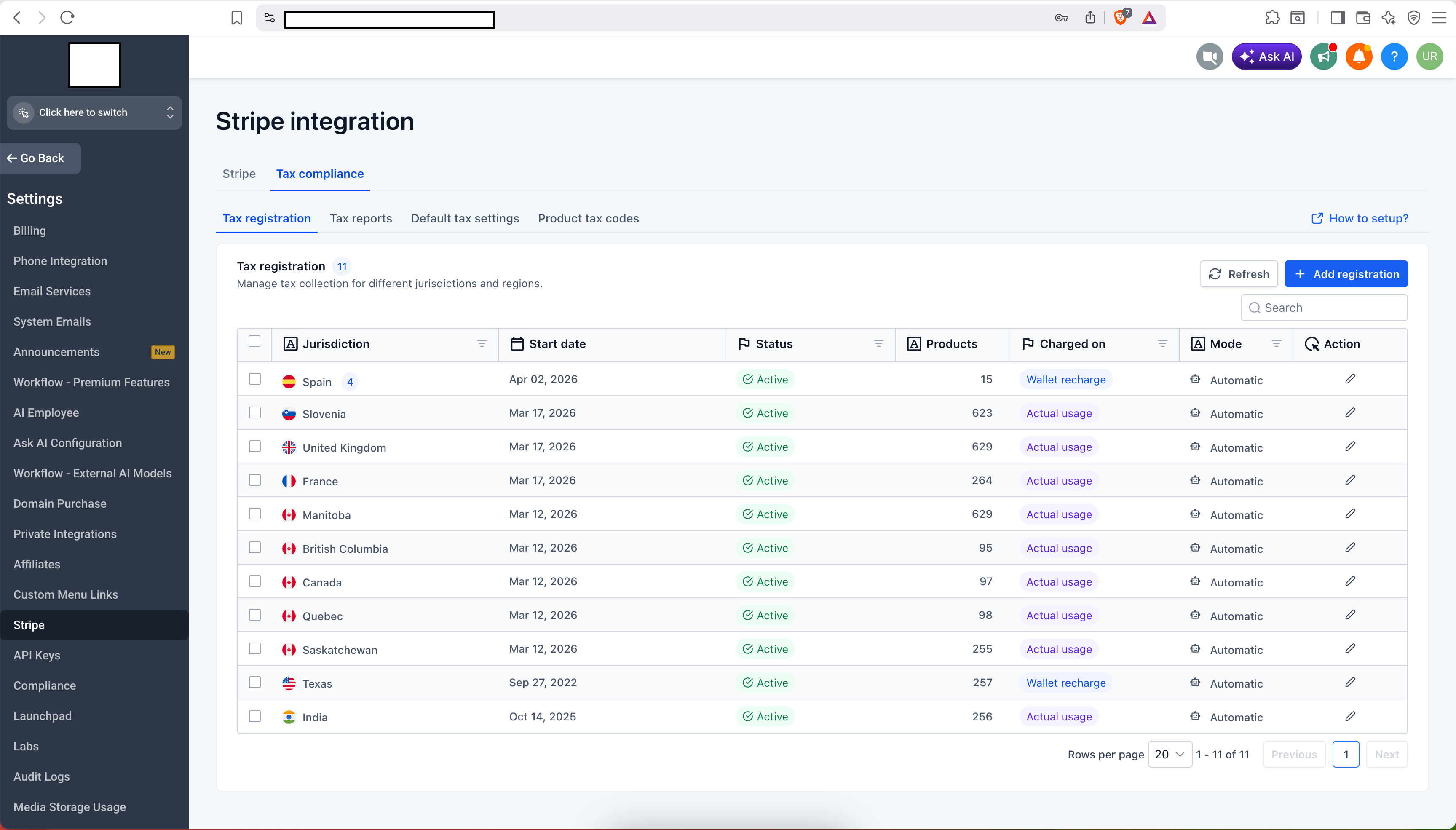
Multi-Jurisdiction Tax Registration
- 100+ Countries Supported: Supports configuration for US state-level sales tax, Canadian GST/HST/PST at the province level, EU VAT across member states, OSS Union, OSS Non-Union, IOSS, and VAT/GST regimes across Asia Pacific, Latin America, the Middle East, and Africa, based on your Stripe Tax registrations.
- Automatic Jurisdiction Sync: Complete your registration in Stripe Tax and return to the platform. Your registered jurisdictions appear automatically.
- Registration Status Tracking: Each jurisdiction displays its current status: Active, Pending, Scheduled, or Expired.
Two Collection Modes
Automatic: Stripe Tax determines and applies tax rates to transactions based on your configuration. Note: Stripe Tax may apply additional per-transaction fees depending on your Stripe plan.
Manual: All tax calculation, collection, invoicing, and remittance for that jurisdiction are handled entirely by the user outside of the platform. the platform does not calculate or apply any tax for jurisdictions set to Manual mode.
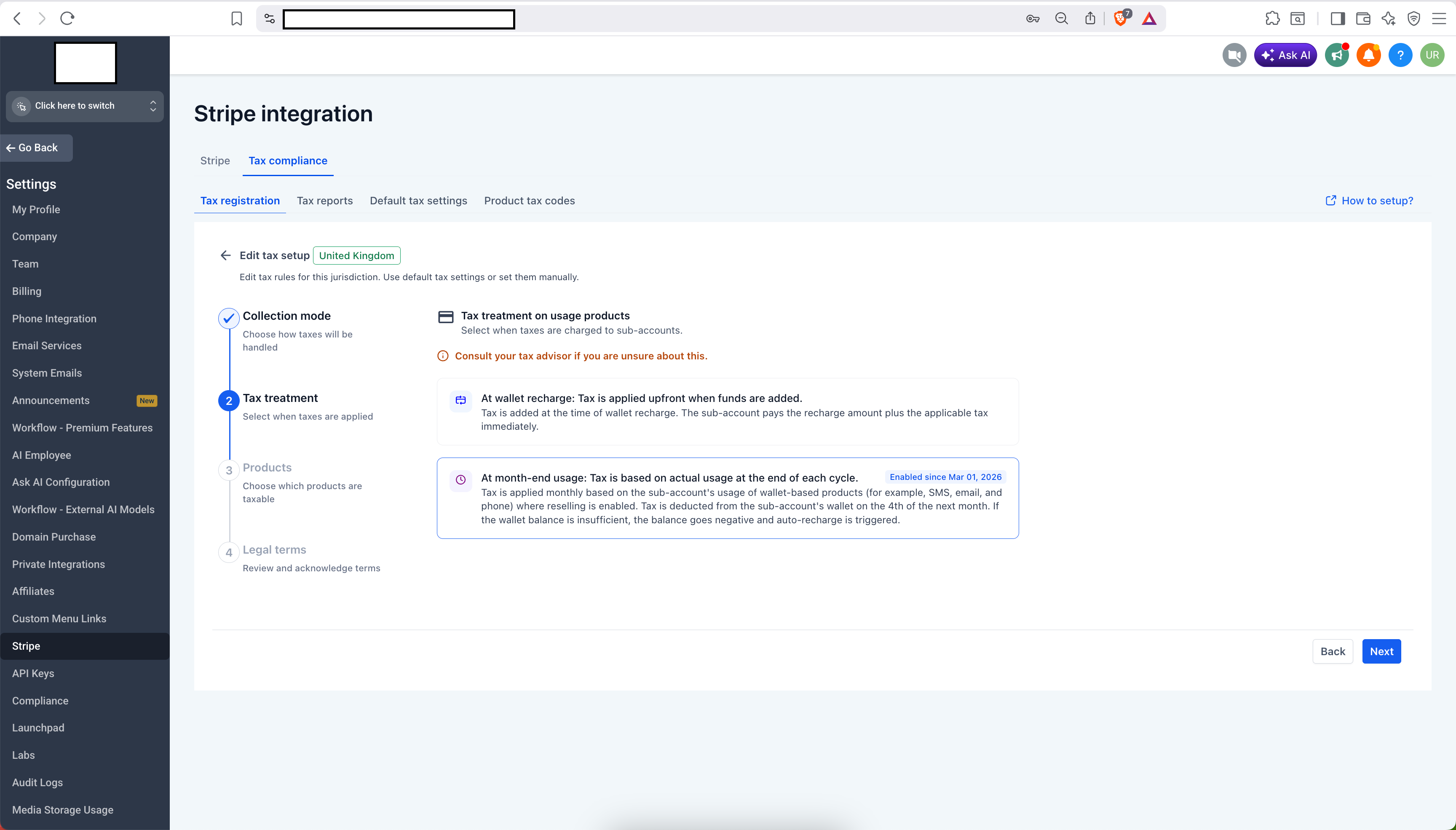
Two Tax Treatment Options
- On Recharge (Wallet Top-Up): Tax is applied at the time an account adds funds to their wallet, based on the account's billing address and your active registration for that jurisdiction.
- At Month End (Actual Usage): Tax is applied at the end of the month based on actual product usage for the period. The amount is charged to the account's wallet at the start of the following month. If the wallet balance is insufficient, it may go negative and trigger an auto-recharge.
- Switching Treatments: Switching between treatments is scheduled to a future date to avoid mid-period disruptions.
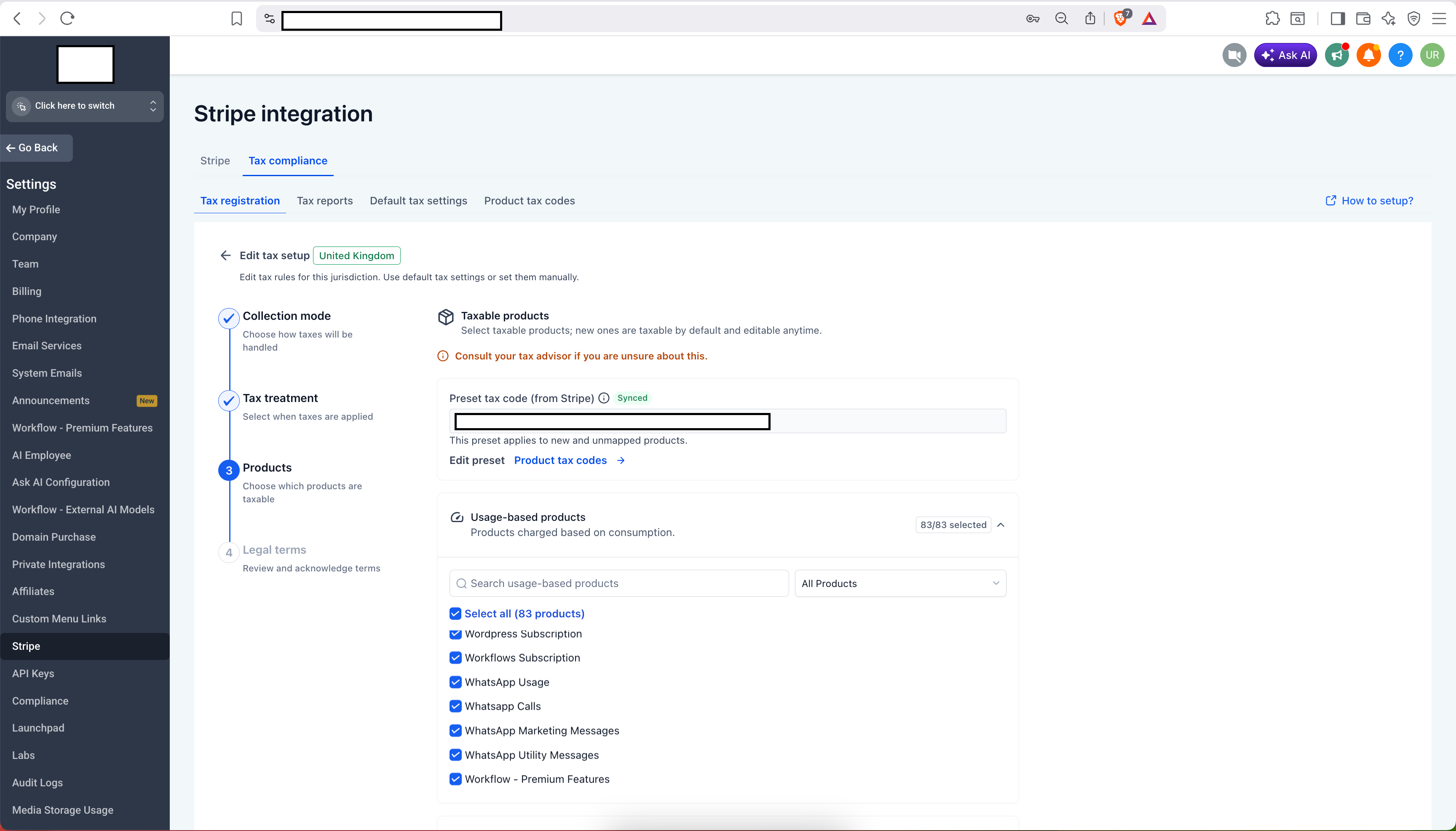
Product Coverage
Usage-Based Products: Configure tax for SMS, email sends, AI usage, phone calls, WhatsApp messages, and other consumption-billed products.
Subscription-Based Products: Configure tax for recurring SaaS subscription plans. Configuration applies to new subscriptions created after setup. Existing subscriptions are not retroactively affected.
Marketplace Apps: Configure tax for third-party apps from the platform Marketplace individually or in bulk.
Screenshot 2026-04-24 at 7
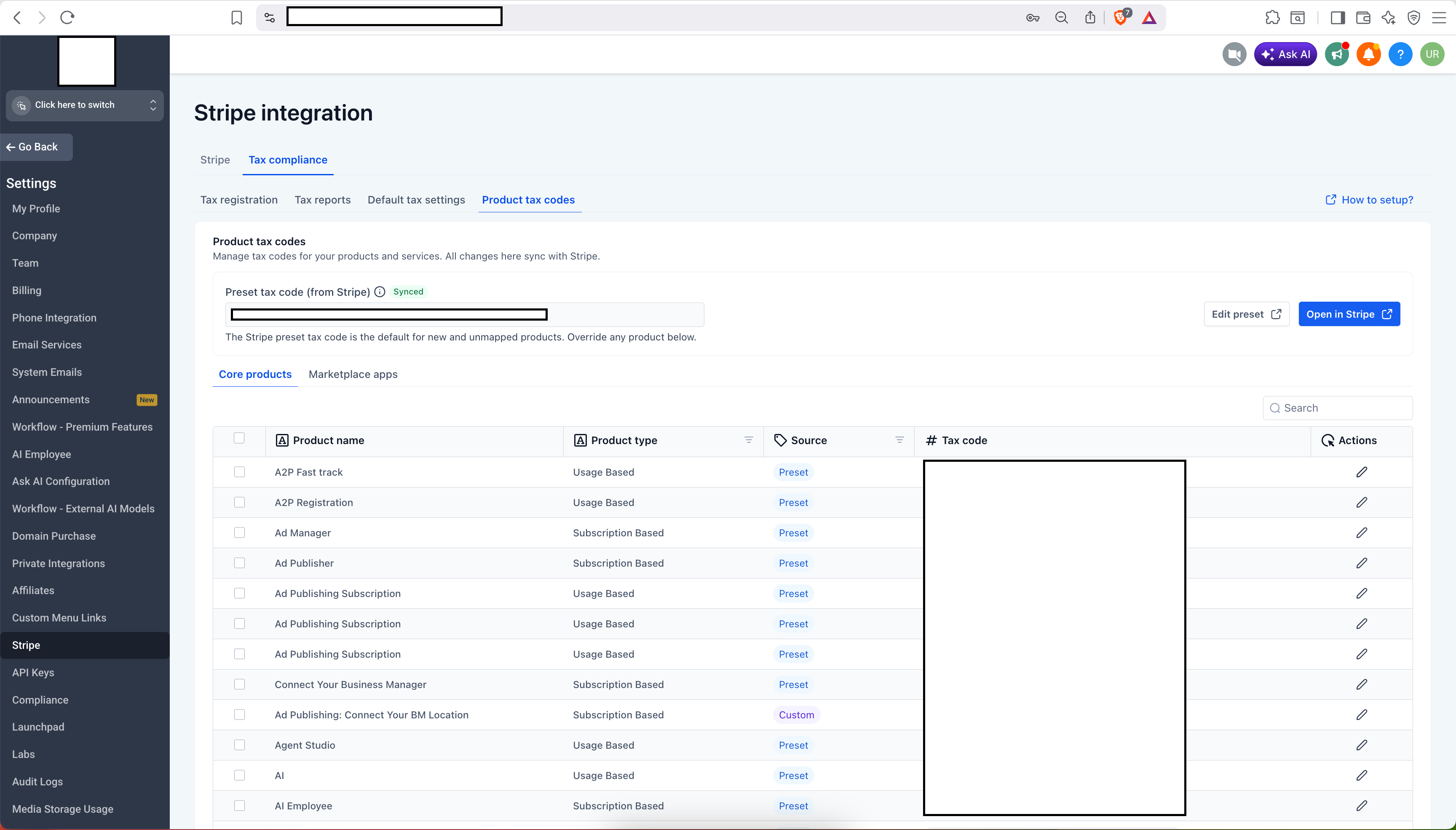
Product Tax Codes
- Each product maps to a Stripe Tax Code used to classify it for tax purposes (SaaS software, digital services, telecommunications, etc.).
- Use preset codes assigned by Stripe or customize per product.
- Set a default tax code for products without a custom assignment.
- Sync with Stripe at any time to pull the latest mappings.
Default Settings
- Configure preferred collection mode, tax treatment, and product taxability as a company-wide default.

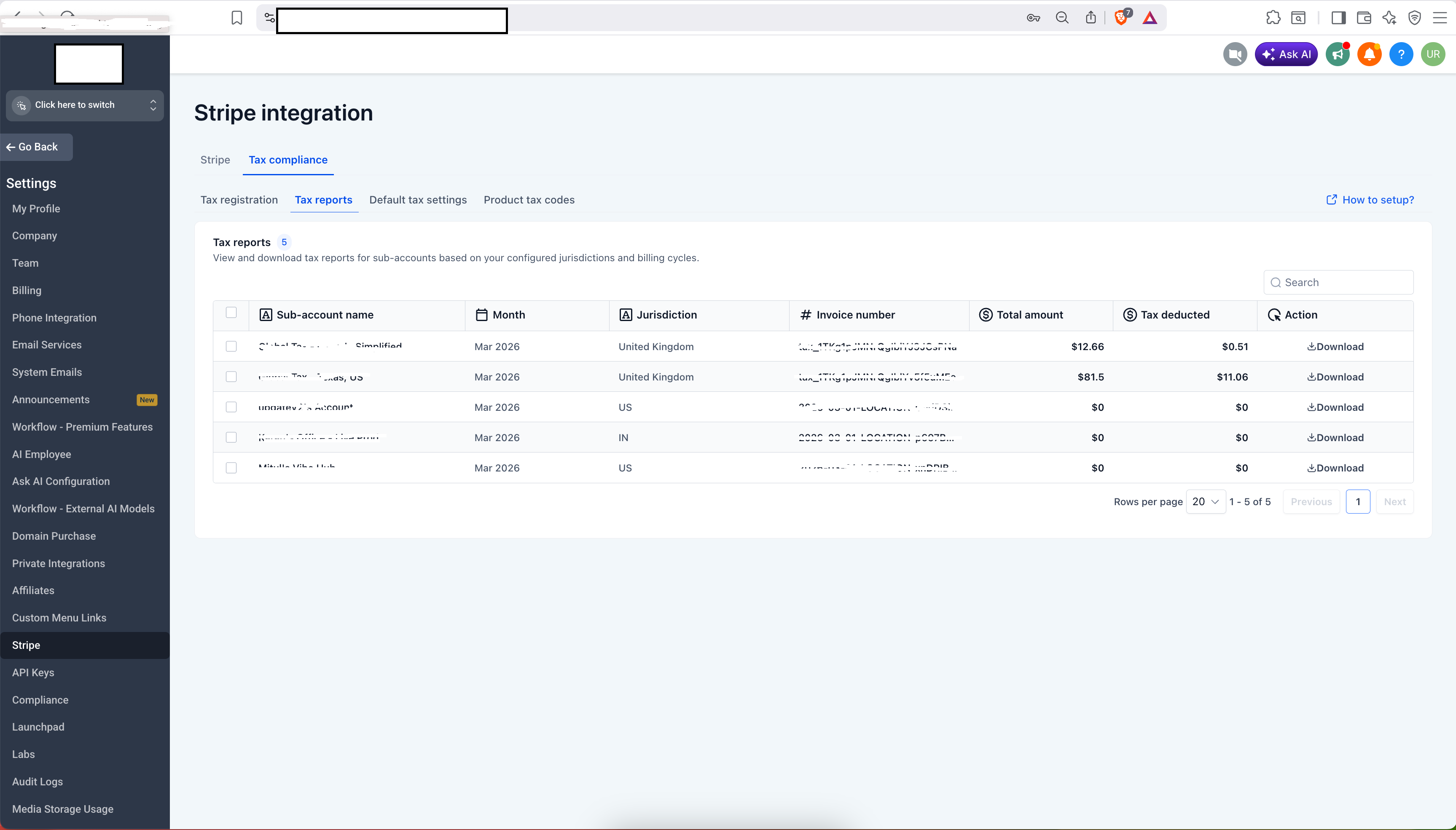
Tax Reports and Invoices
- Tax invoices are generated per account and jurisdiction for taxable transactions.
- View, filter, and sort tax transactions by account, jurisdiction, and month from the Tax Reports tab.
- Download individual period reports or request a bulk ZIP file via email.
- Account owners can access and download their own tax invoices from their billing section.
How to Enable
- Go to Settings > Labs.
- Toggle Global Tax Compliance on.
- Go to Settings > Stripe > Tax Compliance.
- Ensure all accounts have a valid billing address (including zip code) under Billing > Payments > Billing Address. This is required for jurisdiction matching to function.
- Complete tax jurisdiction registrations in Stripe Tax. They sync to the platform automatically.
- Click Configure Tax next to any jurisdiction to set collection mode, tax treatment, and taxable products.
- Optionally configure Default Tax Settings to apply a consistent setup across all jurisdictions.
- Review and accept the legal confirmation, acknowledging your responsibilities as outlined.
Your Responsibilities

Before enabling this feature, please review the following:
- Tax registration: You are responsible for determining where you are required to register and for completing all registrations with the relevant tax authorities.
- Calculation verification: Tax calculations are provided by Stripe Tax. the platform does not guarantee their accuracy. You are responsible for verifying that the amounts calculated are correct for your specific situation before remitting to authorities.
- Tax remittance: Collecting tax through this feature does not remit it on your behalf. You are responsible for filing returns and remitting collected taxes to the relevant tax authorities in accordance with local regulations.
- Professional advice: Tax obligations vary significantly by jurisdiction, business type, and product mix. We strongly recommend consulting a qualified tax advisor before configuring and relying on this feature.
Was this article helpful?
That’s Great!
Thank you for your feedback
Sorry! We couldn't be helpful
Thank you for your feedback
Feedback sent
We appreciate your effort and will try to fix the article